Claude Code Memory Leak? One Command to Save Your MacBook
TL;DR: I built an open-source tool to fix this → claude-code-cleanup
Recently while using Claude Code and Codex CLI, I noticed a problem: my MacBook kept getting slower, with the fans spinning like crazy.
Opening Activity Monitor revealed dozens of claude processes running in the background, each consuming 60-170MB of memory. Some users have reported accumulations up to 30GB.
This isn’t just me. A quick search through GitHub Issues confirmed this is a known bug that hasn’t been officially fixed yet.
How Bad Is It?
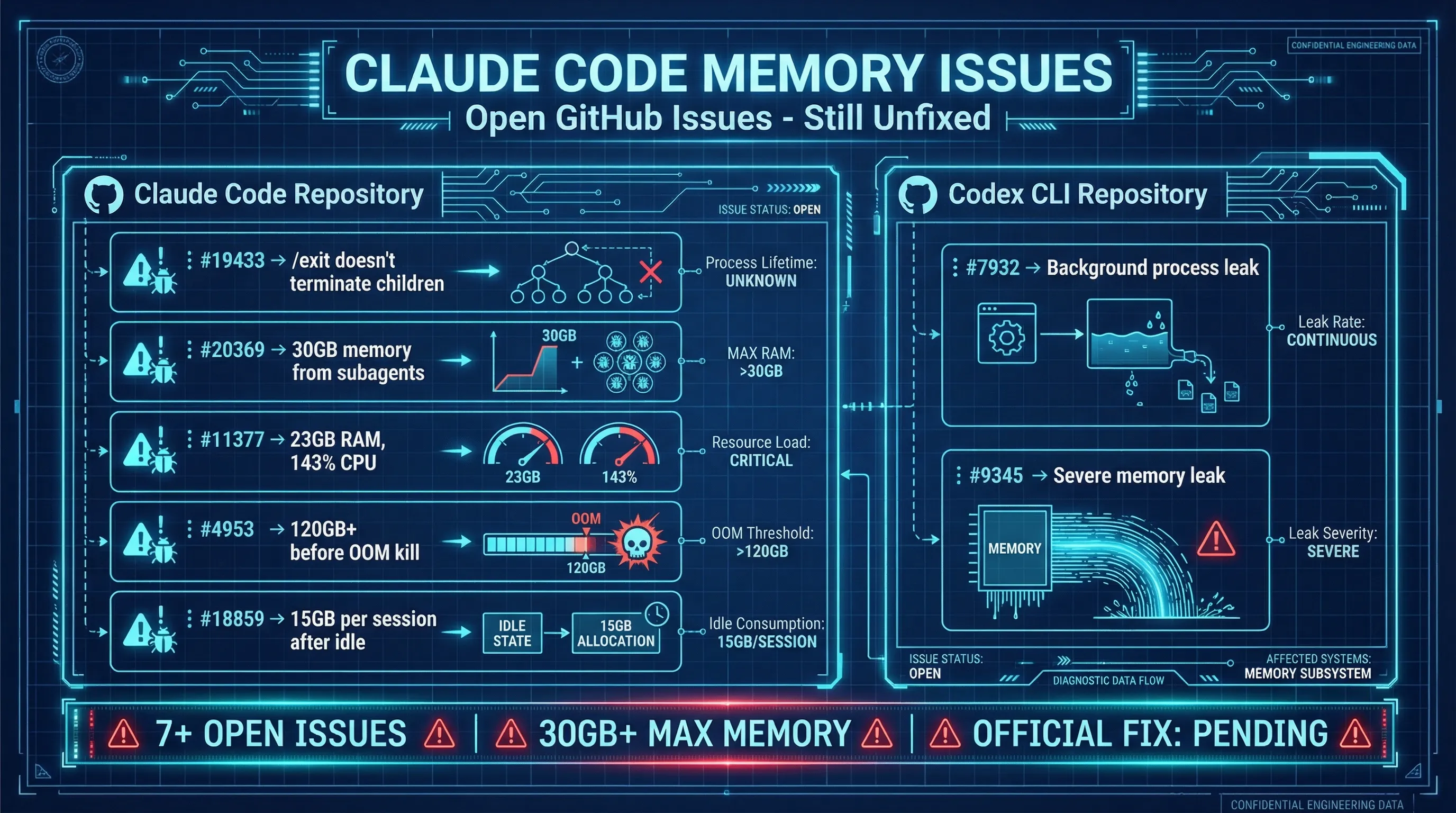
I found numerous related issues in the official Claude Code and Codex CLI repositories:
Claude Code:
#19433—/exitcommand doesn’t terminate child processes, causing orphan process buildup#20369— Sub-agent processes not cleaned up when parent terminal closes, accumulating 30GB memory#11377— Process consuming 23GB RAM, 143% CPU#4953— Process grew to 120GB+, killed by OOM killer#18859— After 18 hours idle, each session accumulates ~15GB memory
Codex CLI:
#7932— Background process leak + missing job control, processes continue after Esc exit#9345— Severe memory leak
All these issues are still Open. No official fix has been provided.
Root Cause
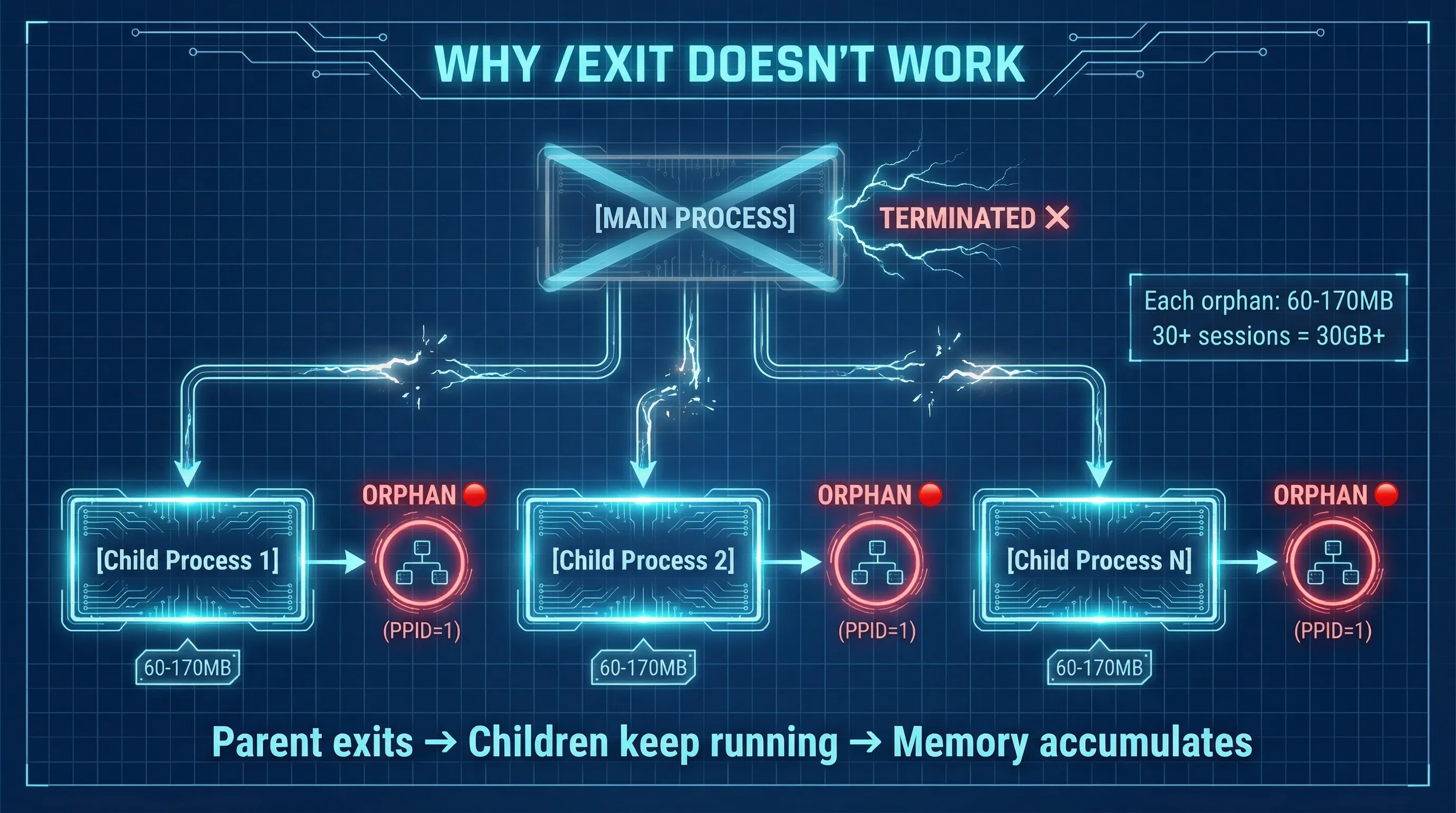
The problem lies in child process management:
Main Claude/Codex process (terminated by /exit or closing terminal)
├── Child process 1 (never received termination signal → becomes orphan)
├── Child process 2 (never received termination signal → becomes orphan)
└── Child process N (accumulating... 60-170MB each)
When you close Claude Code or Codex CLI, the main process terminates, but its child processes aren’t properly cleaned up. These orphan processes’ parent process ID (PPID) becomes 1, and they continue running in the background, consuming memory.
Solutions
Since the official fix isn’t here yet, let’s take matters into our own hands.
I’ve written a complete cleanup tool, open-sourced on GitHub: claude-code-cleanup
It includes:
ccclean.sh— A complete cleanup script with interactive UI- Claude Code Skill — Supports the
/cccleancommand
Here are solutions of varying complexity.
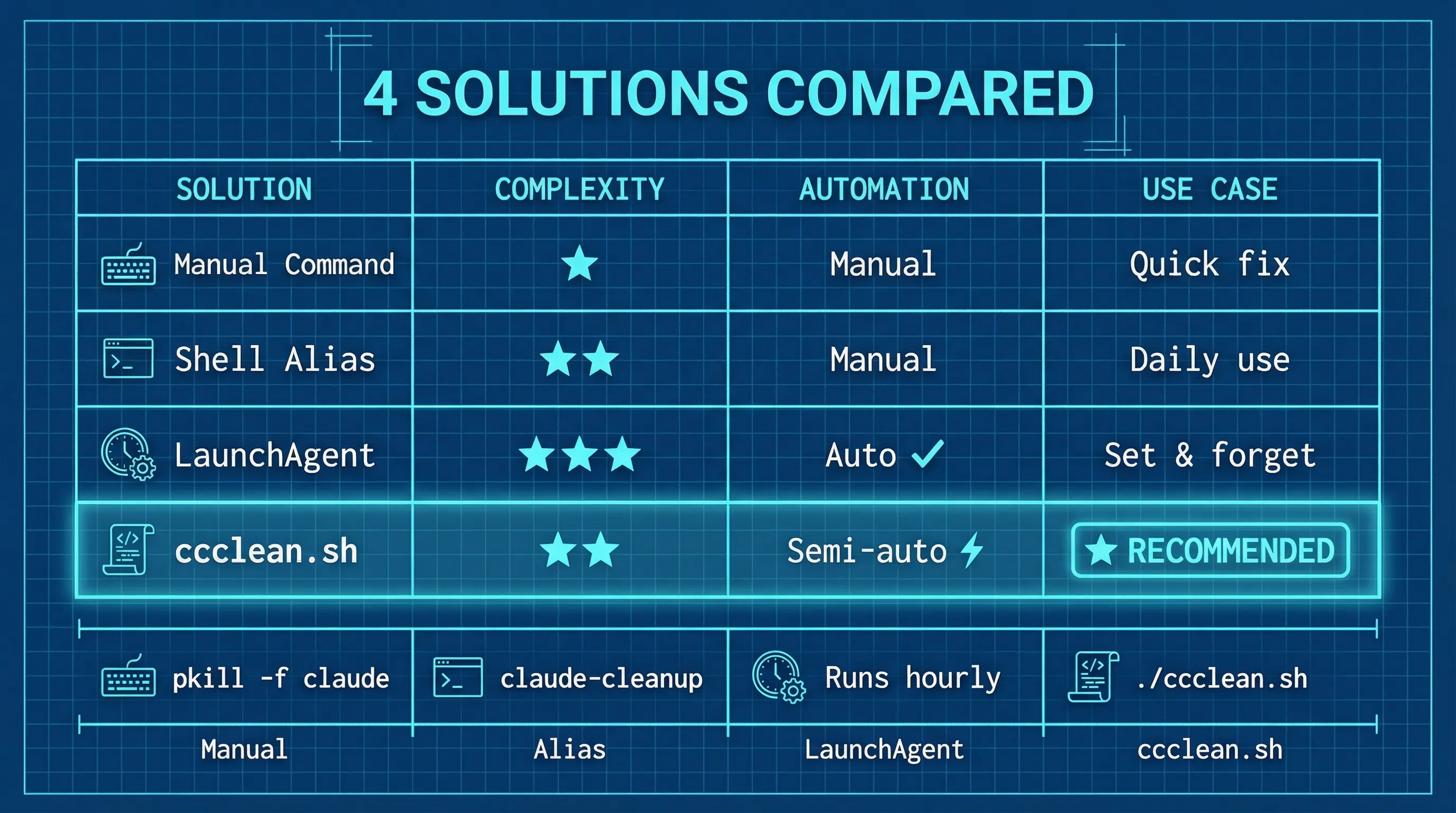
Solution 1: Manual Cleanup (Immediate Effect)
# Check how many orphan Claude processes exist
ps aux | grep '[c]laude' | awk '$7 == "??" {print $2}' | wc -l

# Kill all orphan processes
ps aux | grep '[c]laude' | awk '$7 == "??" {print $2}' | xargs kill -9 2>/dev/null

# Or the simple approach: kill all Claude-related processes
pkill -f claude

# Same for Codex CLI
pkill -f codex
Solution 2: Add a Quick Alias
Add to ~/.zshrc or ~/.bashrc:
alias claude-cleanup='ps aux | grep "[c]laude" | awk "\$7 == \"??\" {print \$2}" | xargs kill -9 2>/dev/null && echo "✅ Claude orphan processes cleaned"'
Then just run claude-cleanup whenever needed.
Solution 3: Automatic Scheduled Cleanup
If you often forget to clean up manually, set up an hourly daemon:
cat > ~/Library/LaunchAgents/com.user.claude-cleanup.plist << 'PLIST'
<?xml version="1.0" encoding="UTF-8"?>
<!DOCTYPE plist PUBLIC "-//Apple//DTD PLIST 1.0//EN" "http://www.apple.com/DTDs/PropertyList-1.0.dtd">
<plist version="1.0">
<dict>
    <key>Label</key>
    <string>com.user.claude-cleanup</string>
    <key>ProgramArguments</key>
    <array>
        <string>/bin/bash</string>
        <string>-c</string>
        <string>ps aux | grep '[c]laude' | awk '$7 == "??" {print $2}' | xargs kill -9 2>/dev/null || true</string>
    </array>
    <key>StartInterval</key>
    <integer>3600</integer>
    <key>RunAtLoad</key>
    <true/>
</dict>
</plist>
PLIST

# Load the daemon
launchctl load ~/Library/LaunchAgents/com.user.claude-cleanup.plist
Management commands:
# Check status
launchctl list | grep claude-cleanup

# Manually trigger a cleanup
launchctl start com.user.claude-cleanup

# Want to remove it? Unload it
launchctl unload ~/Library/LaunchAgents/com.user.claude-cleanup.plist
rm ~/Library/LaunchAgents/com.user.claude-cleanup.plist
Solution 4: Complete Cleanup Script (Recommended)
For a safer, more comprehensive solution, use my ccclean.sh script:
# Download
curl -O https://raw.githubusercontent.com/YuancFeng/claude-code-cleanup/main/ccclean.sh
chmod +x ccclean.sh

# Run
./ccclean.sh
Safety features of this script:
- Precise matching: Only kills processes named exactly
claude, won’t kill other programs - PID reuse protection: Verifies process start time before killing, prevents killing new processes
- Runtime protection: Skips processes running less than 5 minutes
- Double confirmation: Lists all candidate processes, lets you select, then confirms again
- Graceful termination: Sends SIGTERM first, waits, then sends SIGKILL
Daily Usage Tips
Until the official fix arrives, these habits can help reduce the problem:
| Tip | Explanation |
|---|---|
| Restart every 30-45 minutes | Set a timer to prevent unlimited memory accumulation |
Use /clear command frequently | Clears context, reduces memory usage |
Use /exit when closing | Still has issues, but better than just closing the terminal |
| Avoid long idle sessions | Idle sessions also leak memory |

Summary
| Question | Answer |
|---|---|
| Is this a known issue? | Yes, there are many related issues on official GitHub |
| Has it been officially fixed? | Not yet |
| Are there workarounds? | Yes, see the manual/automatic cleanup methods above |
Claude Code is a powerful tool, but this memory leak issue definitely affects the experience. Hopefully the official fix comes soon.
Until then, claude-cleanup is your best friend.
Open Source Tool
I’ve open-sourced the complete solution on GitHub:
It includes two tools:
ccclean.sh— A standalone bash script with interactive UI, ready to download and run- Claude Code Skill — If you’re also using Claude Code, copy
skill/SKILL.mdto your skills directory, then use the/cccleancommand directly
Stars and Issues are welcome.
If you found this helpful, consider buying me a coffee to support more content like this.
Buy me a coffee